Appearance
Dashboard
The dashboard is the first screen after you sign in. It's a snapshot of what's happening today, and what it shows depends on your role — staff and administrators see how the whole shelter is doing, while volunteers and fosters see their own tasks.
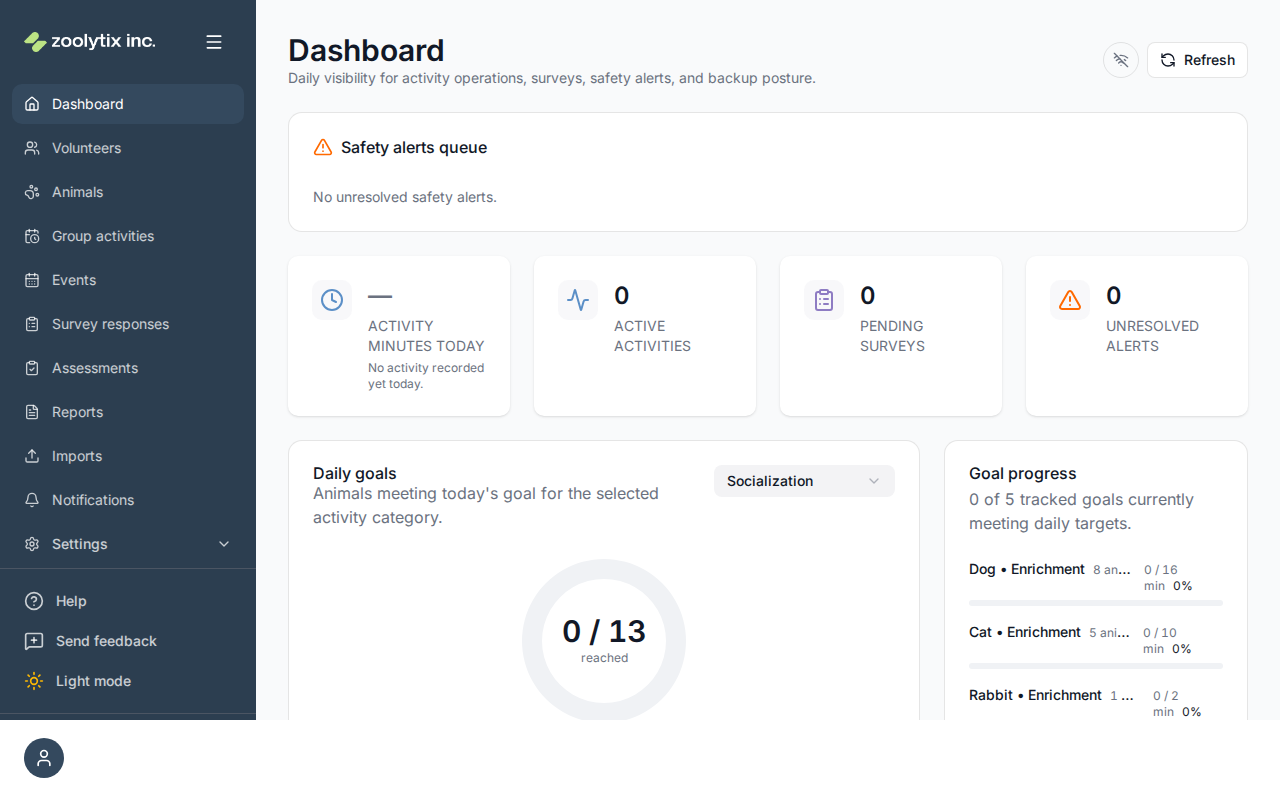
For staff and administrators
The operational dashboard is built from cards, each answering one question:
- Total animals / Active roster / Checked out / Offboarded — the headline counts. Active roster is animals currently in your care; checked out is animals in an activity right now; offboarded is animals that have left (adopted, transferred, etc.).
- Safety alerts queue — open safety concerns raised by volunteers or staff that still need a response. Admins can resolve an alert here with a note.
- Animals being missed — which animals have had no goal activity today, and which have gone days without (see below).
- Activity minutes today — how many minutes of activity have been logged so far today. Like every minutes figure in ShelterSync, it counts only activities whose length someone observed: one closed with Override end is left out until its real times are entered on Time corrections, and then counts here, in the reports and in goal progress alike (see which activities count). A drop-off is left out: it is not time anyone spent.
- Daily goals and Goal progress — how animals are tracking against their daily activity targets, broken down by category (see the math below).
- Pending surveys — completed activities that are still waiting for their survey to be filled in.
- Recent activity — a live feed of activities being started and finished.
Animals being missed
Right under the counts is the card the dashboard exists for: which animals are being missed — the animals in care that nobody has spent time with. It has two lists.
- Nothing today — the animals with no activity so far today, in any category, whether or not the animal's species has an enrichment plan.
- Missed 2+ days in a row — the animals that have gone two or more whole days, ending yesterday, with none. Each shows the length of the run; 14+ means it reached the two weeks the card looks back over. Today is never part of a run, because today is not over — an animal can be on a run and in today's list, and its row says "and nothing yet today".
Every name links to the animal's profile. Each row also shows the animal's current daily minimums, for context only — or No plan when it has none; the plan plays no part in who is listed. When both lists are empty the card says so — nobody is being missed — rather than showing nothing.
What a row means, and what it does not:
- This is not "a goal was missed". An animal that got a short walk against a 30-minute minimum is not here; that is what Animals with unmet goals is for. A session of any length counts as activity, even one under a minute that credits no goal time.
- A drop-off does not count as activity here. A drop-off is something left in the kennel, and nobody spent time with the animal, so an animal whose only activity was a drop-off is still listed — even though the drop-off counts toward its goal.
- An activity counts once it records how long it took — whatever status it was given. A walk the volunteer started and ended is time on the record even if they marked it abandoned. An activity closed with Override end records when it was closed rather than how long it took, so the animal stays listed until its real times are entered on Time corrections (see which activities count). A row says how many of the day's activities were abandoned, so you can tell "somebody started something" from "nobody did".
- A run is judged on the animal's recorded intake date. The intake day and any day before it are not counted, so a run cannot reach back past the day the animal arrived; nothing else about its history is consulted. An animal that arrived today is marked Arrived today.
- Days follow your reporting timezone, set in Organization settings — a day runs from your day-start time to the next one, in your own timezone rather than in UTC. That start is midnight unless an administrator has set another.
Each list shows up to twenty-five animals and says how many more there are. The Nothing today list links to the Animal daily activity report for the same day, whose Animals with no activity section names the same animals — it is the same reading over the same reporting day, not a second calculation.
The summary cards along the top are also shortcuts: click Pending surveys to open the survey responses list filtered to pending items, and click Active activities or Unresolved alerts to jump to that section further down the page. Cards you can act on highlight when you point at them, and every card shows a short definition of what it counts when you hover over it (or focus it with the keyboard).
Live activities — ending an activity
The Live activities table lists every in-progress activity. Depending on your permissions, a row can offer two different endings — and they are not interchangeable:
- End activity appears on activities you started (from the web or your phone). It ends the session normally — mark it Completed (or Abandoned) — and asks one thing afterwards: where a post-activity survey is waiting on the activity, a completed session walks you straight into it; where none is, the dialog offers a single notes box instead. The dialog says which before you confirm, and abandoning cancels a waiting survey without opening it. This is the everyday way to finish your own session; it ends the activity in exactly the same way the phone does — the only difference is that the phone also asks where the animal is going back to. Here the animal goes back where it was when the activity started, even if the activity took it somewhere else (unless someone has moved it since). An animal that left the shelter while it was out, adopted in ShelterLuv for example, stays where it is and unavailable, whichever way its activity ends: a place named when ending it must still be one the end accepts, but the animal is not moved there. Staff and admins can start these sessions from an animal's profile — see Animals → Start an activity.
- Override end is the admin escape hatch for someone else's stuck activity (say, a volunteer left without ending the timer). It requires a written reason, is recorded as an override in the audit log, and cancels any pending post-activity surveys — so never use it on a session you could end normally. Its Check-in location is filled in with where the animal was when the activity started (or where someone has moved it since); pick another place if it went somewhere else. An animal that has left the shelter stays where it is: the place picked must still be one the end accepts, but the animal is not moved there. The end time it records is the moment you closed it, not when the activity finished, so the activity is listed on Time corrections until someone enters the real times.
A row can also read Paused. A volunteer, or a foster with an animal placed with them, can pause an activity from the phone's timer when something interrupts them — a phone call, a dog that needs a break — and resume it when they come back. While it is paused, its Duration stands still. Pausing changes nothing else:
- A paused activity is still in progress. It still has to be ended to count at all, and the animal cannot be taken out for another activity until it is. A pause left running is the same as a timer nobody stopped: the activity stays here until it is ended, and if the volunteer has gone, Override end closes it the same way.
- Paused time is never counted. The minutes an activity is counted for — in this table, the day's activity minutes, goal progress and the reports — leave the paused time out. An activity's own page shows its duration that way and says how long it was paused. It rounds both up to the next whole minute, as the reports and the day's activity minutes do — so a session of 7 minutes 10 seconds reads 8 min there, where that page used to round to the nearest minute and read 7. Goal progress rounds the other way, counting only whole minutes spent.
For volunteers and fosters
Non-operational users get a personal dashboard instead:
- Account status — whether your account is in good standing.
- My pending surveys — surveys you still need to complete.
- Upcoming events — what's coming up at the shelter.
- My recent activity — the activities you've logged.
- Favorited animals — quick links to the animals you've starred.
You'll only see cards your role can use — the dashboard hides the rest rather than showing an error.
Surveys you still owe
A survey waiting on an activity you ran belongs to you, even before anyone has answered it — nobody's name is on it yet, and it's still yours. Those surveys appear on My pending surveys.
Use Complete on a row to answer one right there, without going back to the phone; it asks the same questions the mobile app would. The button appears on activities you ran yourself, once the activity has ended. View all opens the full Survey responses list filtered to pending, where you can do the same thing.
If the card says "You have no pending surveys — all caught up", that is what the list actually came back with. If it couldn't load, it tells you that instead — it never reports "caught up" when it doesn't know.
Understanding the goal-progress card
This card can look like a fraction (for example 3 / 13) and a percentage. Here's the simple math:
- Pick a category (like Enrichment or Exercise) with the selector on the card.
- The bottom number is how many animals have a daily goal set for that category today.
- The top number is how many of those animals have already met today's goal — meaning the activity minutes logged for them so far today have reached their target. A drop-off counts here too, with the Typical minutes set for its activity.
So 3 / 13 means: of 13 animals expected to get enrichment today, 3 have hit their target so far. The numbers update through the day as activities are logged.
Each animal's target is its species' enrichment plan (set in the plan setup wizard) plus its own individual plan, where it has one — so an animal on "+30" is measured against 150 minutes while the rest of its species is measured against 120.
The Goal progress card beside it breaks the same population down by species and category, and counts the animals the same way. Every animal of the species appears on a row backed by a species enrichment plan; a category that only an individual plan asks for gets a row of its own, with a No species plan line under its name, counting just the animals whose plan asks for it. An animal whose target in a category is zero — the species plan sets it to 0, or its individual plan takes the whole target off — is on the plan with no daily minimum and is counted on neither card. Before this release a reduction to zero counted as a goal met; it does not any more, because a minimum of nothing is not a minimum.
The card shows at most eight rows, alphabetically by species and then by category. A shelter with more species-and-category pairs than that sees a last line saying how many rows are not shown. The rows are cut off; the counts are not — the "tracked goals currently meeting daily targets" line above them counts every row with at least one animal in care, whether or not it is shown. A row with no animals in care is shown, marked No animals in care, but is not a tracked goal. A row whose animals are all on the plan with no daily minimum is shown too, marked No minimum with the number of animals, and is not a tracked goal either.
One gap remains between the two: Goal progress groups by species, so an animal whose species does not match anything in your species list appears in the donut but on no row of the Goal progress card. If a species-and-category row looks short by an animal, check that animal's species against Settings.
Fields explained
| Field | What it means |
|---|---|
| Summary cards | The cards along the top are shortcuts, not just numbers: Pending surveys opens the survey responses list filtered to pending, and Active activities and Unresolved alerts scroll to their sections further down the page. Cards you can act on highlight when you hover or focus them, and every card shows a short definition of what it counts when you point at it or focus it with the keyboard. |
| Activity minutes today | The day's total is rounded up to the next whole minute once, over the whole total rather than once per session — so a morning of very short check-ins is counted as the time it actually took. Every total elsewhere is rounded the same way, over its own span, which means separate figures do not add up to each other and the gap grows with the number of rows, so do not add displayed rows together to check a total. Goal progress works differently on purpose: it counts only whole minutes actually spent, so a session under a minute adds nothing toward a daily target, and a drop-off — something left in the kennel and logged as done, with no timer — counts the Typical minutes set for its activity toward the target. A drop-off is not time anyone spent, so this card leaves it out entirely. This card counts individual activities only — a group session with several animals does not appear here — and, like every figure in ShelterSync that totals activity minutes, only activities whose length someone observed. An activity closed with Override end records the moment it was closed, not when it finished, so it is left out until its real times are entered on the Time corrections page; once corrected it counts here, in the reports and in goal progress alike, whether it was marked completed or abandoned. The Reports Activity summary for the same day counts group sessions too, so it reads higher than this card on a day that held one. To check this card, export the interaction detail for that day with no filters set, keep the rows whose Row Type reads activity, add up their Duration Milliseconds, divide by 60000 and round up. |
| Goal progress — animals counted | Each row counts the animals in care that have a daily target in that category — every animal of the species when your species enrichment plan sets one, plus any animal whose own plan sets a target for a category the species plan does not cover. Those rows carry a No species plan line under their name. An animal whose target in that category is zero — the species plan sets it to 0, or its individual plan takes the whole target off — is on the plan with no daily minimum: it is not counted here, and the daily goal donut does not count it either. (Until this release a reduction to zero was counted as a goal met; it is not any more.) The card shows at most eight rows, alphabetically by species and then by category; when there are more, its last line says how many are not shown. The line above the rows — how many tracked goals there are and how many are meeting their target — counts every row with at least one animal in care, whether or not it is shown; a row with no animals in care is shown, marked as such, but is not a tracked goal, and neither is a row marked No minimum, whose animals are all on the plan without a daily minimum. One gap remains: this card groups by species, so an animal whose species could not be matched to your species list appears in the donut but on no row here. |
| Animals being missed | Two lists, both about animals in care that nobody has spent time with. Nothing today names the animals with no activity so far today — any category, whether or not the animal's species has an enrichment plan. Missed 2+ days in a row names the animals that have gone two or more whole days, ending yesterday, with none — with the length of the run, and 14+ when it reaches the two weeks the card looks back over. Today is never part of a run, because it is not over; an animal can be on a run and also in today's list, and its row says so. A run is judged on the animal's recorded intake date: the intake day and any day before it are not counted, and nothing else about its history is consulted. This is not the same as a goal being missed: a short session against a long minimum is not a miss here (Animals with unmet goals covers those), and a session of any length counts as activity, even one under a minute. A drop-off does not: it is something left in the kennel, and nobody spent time with the animal, so an animal whose only activity was a drop-off is still listed, even though the drop-off counts toward its goal. An activity counts once it records how long it took, whatever status it was given: a walk the volunteer started and ended is time on the record even if they marked it abandoned. An activity closed with Override end records when it was closed rather than how long it took, so it counts only after its real times are entered on Time corrections, and the animal is listed here until then. A row says how many of the day's activities were abandoned, so a start that came to nothing reads differently from nobody having tried. The daily minimums on a row are the animal's current plan, shown for context only; an animal with none reads No plan and is listed all the same. Each list shows up to twenty-five animals and says how many more there are; the Animal daily activity report for the same day lists the same animals in its Animals with no activity section, because both are the same reading over the same reporting day. Days here follow the reporting timezone set in Organization settings. |
| Animals with unmet goals — Priority | Animals carrying a priority care tag are listed first here, ahead of the usual "most unmet goals first" order, and show an up-arrow badge. Priority tags are set per tag in Settings → Lookups → Care tags, so your organization decides which tags mean "attend to these first" — the mobile animal list uses the same order. A priority tag only changes where an animal sits in this list; it never adds an animal to it, so an animal that has met all its goals still does not appear. |
| My pending surveys | The surveys that are yours and not finished: ones waiting on an activity you ran, and ones you started answering. A survey does not need to have your name on it to be yours — one waiting on an activity you ran has no responder until somebody submits it, and it still belongs to you. Use Complete on a row to answer it here; you do not have to go back to the phone. The button appears once the activity has ended, and only on your own activities. "All caught up" means the list came back empty, not that nothing could be found — if the card could not load, it says so instead. |
| Live activities — End vs Override end | Rows in Live activities can offer two different endings. End activity appears on activities you started yourself: it completes (or abandons) the activity normally and asks one thing afterwards — the post-activity survey, where one is waiting on the activity, or a single notes box where none is. The dialog says which before you confirm; completing walks you straight into the survey, abandoning cancels it and opens nothing. The phone works the same way, and also asks where the animal is going back to; here the animal goes back where it was when the activity started, even if the activity took it somewhere else, unless someone has moved it since. An animal that left the shelter while it was out, adopted in ShelterLuv for example, stays where it is and unavailable, whichever way its activity ends: a place named when ending it must still be one the end accepts, but the animal is not moved there. Override end is the admin escape hatch for someone else's stuck activity — it needs a reason, and it cancels any pending post-activity surveys, so use the normal end for your own work. Its check-in location is filled in with that same place; pick another if the animal went somewhere else — the list offers your locations marked Housing, since that is where an animal goes back to. The end time it records is the moment you closed it, not when the activity finished, so the activity is listed on the Time corrections page until someone enters the real times. |
| Live activities — Paused | A volunteer, or a foster with an animal placed with them, can pause an activity from their phone when something interrupts them, and resume it when they come back. While it is paused its Duration stands still and reads Paused. A paused activity is still in progress: it still has to be ended to count at all, and the animal still cannot be taken out for another activity until it is. Time spent paused is left out of the activity's minutes in this table, the day's activity minutes, goal progress and the reports. |