Appearance
Your profile
Your profile is where you manage your own details and keep your account secure. Everyone has one, whatever their role.
Update your details
Edit your display name, phone, date of birth, and address, and upload a profile photo. Your email is shown but is managed by an administrator. For your phone, choose the country first and then type the local number — the country code is added for you, so you don't type it.
Your date of birth is yours to keep accurate — you don't need to ask an administrator to correct it. It's never shown to other volunteers and never appears in reports or exports, except in the copy of your own data that you ask for. Everyone using ShelterSync has to be at least 13. Anyone under 18 gets a private profile: their name stays off the leaderboard, and their activity isn't shown to other volunteers. If a corrected date means you're under 18, your profile switches to private; correcting it the other way doesn't reopen a profile that's already private — that stays your shelter's choice to change.
Your security options
ShelterSync protects your account with more than a password. From your profile you can manage:
- Two-factor authentication (MFA) — a second step at sign-in.
- A PIN — a quick re-verification code on a device you've already used.
- Backup codes — one-time codes for when your phone isn't available.
Two-factor authentication
Two-factor authentication (also called MFA) adds a second step after your password, so your account stays safe even if your password is guessed. Depending on your role, your shelter may require it. To set it up:
- Choose to enable an authenticator app.
- Scan the QR code with an app like Google Authenticator or Authy.
- Enter the 6-digit code it shows to confirm.
- Save your backup codes somewhere safe.
If your shelter allows it and you have a phone number on your profile, you can also enable a texted code as a fallback.
SMS verification codes
Enabling SMS verification is opt-in: you turn it on yourself from the security section, and codes are sent to the phone number on your profile. Before you can enable it, you check a consent box confirming that you agree to receive one-time codes by text and that message and data rates may apply — the Enable button stays off until you do.
When you press Enable SMS, we text a code to your phone and ask for it on this page. If you mistype it, the page says how many tries the code has left, and you can try again without a new text. After too many wrong tries the code stops working, and the page asks you to request a new one. Send a new code texts another, also when the first never arrives; it waits a short while between texts.
Turn SMS on here, in a browser. The phone app's Security screen (on Profile) can turn SMS off; to turn it on, it tells you to come here.
If your shelter asks for a code each time you sign in, that code is texted to you only while SMS is on here. Otherwise it comes by email, and so it does after you reply STOP.
Changing your phone number turns SMS off. The code you confirmed went to your old number, so when the number on your profile changes or is removed — by you, or by Zoolytix support at your request — ShelterSync stops texting you. Your sign-in codes come by email, and your authenticator app still works. To get texts at the new number, turn SMS on again here: a code is texted to the new number, and SMS is back on once you enter it.
You can opt out at any time by replying STOP to a ShelterSync text, or reply HELP for help. If you opt out, you can still sign in with your authenticator app or a backup code, and asking for a texted code at sign-in tells you the number has opted out. To start getting texts again, reply START to a ShelterSync text. If you turned SMS off here instead, turn it back on here: we text you a code to confirm. See the SMS Terms & Consent and Privacy Policy pages for details.
Your PIN
A PIN is a 6-digit code you set for yourself. Once you've fully verified on a device, the app can ask for your short PIN instead of a full authenticator code for a while — quicker for repeated actions on a tablet you use all day. Set or change your PIN from the security section here, typing it twice to confirm; if you forget it or it gets locked after too many wrong tries, set a new one.
Backup codes
Backup codes are one-time codes for signing in when you can't use your authenticator app (a lost or dead phone). Keep them somewhere safe. You can regenerate them here if you run low or think they've been seen — regenerating replaces the old set, so the previous codes stop working. To regenerate, enter the current code from your authenticator app; the new codes are shown on the page once. Copy or write them down before you press Done.
Your password
Select Change password in the security section. You'll be asked for your current password first — that's what proves it's really you, so nothing is emailed and you don't need a reset link.
Your new password has to meet your shelter's requirements and has to be different from your current one. If it doesn't qualify, the page tells you exactly which rules it missed rather than just refusing.
Changing your password signs out every other device signed in to this account — a phone you've lost, a shared computer at the shelter, a browser you forgot about. You stay signed in here, and ShelterSync tells you how many other sessions were ended. That's the point of changing it: anyone else holding your old password is now locked out. It also ends any invitation or password-reset link you've been sent and not used, so an older email can't be used to change your password.
If you can't sign in at all, you can't use this — use the Forgot password? link on the sign-in screen instead, or ask an administrator to send you a reset.
Get a copy of your data
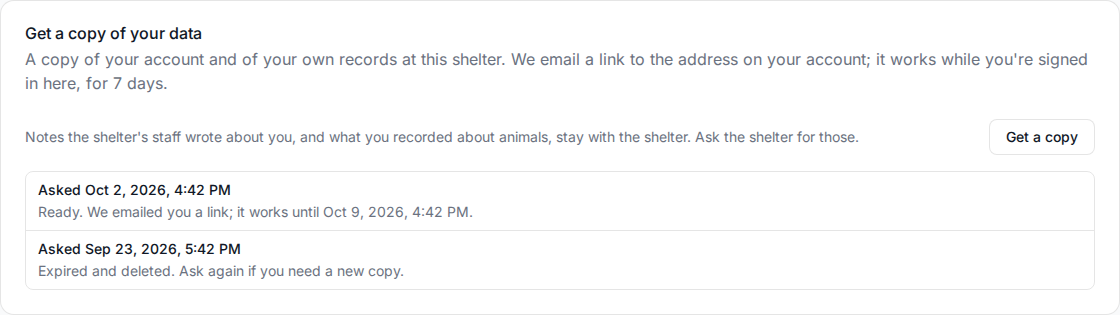
Get a copy asks for a copy of the personal data ShelterSync holds about you. You don't need to ask an administrator. Enter your password to confirm it's you.
The copy covers your account (your details, your sign-ins and your devices) and your own records at the shelter you're signed in to: what you did, when, and with which animal, and your check-in times. For another shelter you belong to, sign in there and ask there.
What isn't in it:
- Notes the shelter's staff wrote about you, such as the reason for a restriction. The shelter holds its own notes; ask the shelter for them.
- What you recorded about an animal, such as ratings, safety flags, notes and survey answers. That is the shelter's record about its animal; ask the shelter for it.
- Anything about other people.
How you get it. The copy takes a moment to prepare. When it's ready, we email a link to the address on your account. The email doesn't contain your data. Sign in to ShelterSync at the same shelter, open the link, and press Download your data. Each download link works for 5 minutes; you can open the link in the email again until it stops working, 7 days after the copy was made. The copy is deleted after 7 days. After that, ask again.
The file opens in a web browser. It has a page you can read, and the same data in a machine-readable format (JSON) for a program to use. It includes your profile photo and the screenshots attached to feedback you sent, up to 5 MB each and 15 MB in all. A file larger than that is listed instead; ask Zoolytix for it. A file that couldn't be read when the copy was made, or that isn't stored where ShelterSync keeps that kind of file, is listed as unreadable.
Your requests are listed under Get a copy of your data, with where each one stands. If it says we couldn't prepare your copy or send the email, ask again.
If you can't sign in to ShelterSync, ask Zoolytix (see the Privacy Policy). After checking it's you, we email a link that works once without signing in. That copy covers your account and your own part of the records at every shelter you belong or belonged to, including one that has restricted you, marked you inactive or removed you, and one that has closed. No copy includes anything a shelter recorded about you before your details were removed from it at your request (see Delete your data), even if it was changed later. Records the shelter made since are included; that only happens if Zoolytix adds you back to the shelter, which a shelter can't do itself. The copy says which records are left out. Your own sign-in history and requests are Zoolytix's records, not the shelter's, and stay in your copy.
Delete your data
At the bottom of your profile, Delete your data lets you remove yourself from ShelterSync. You don't need to ask an administrator.
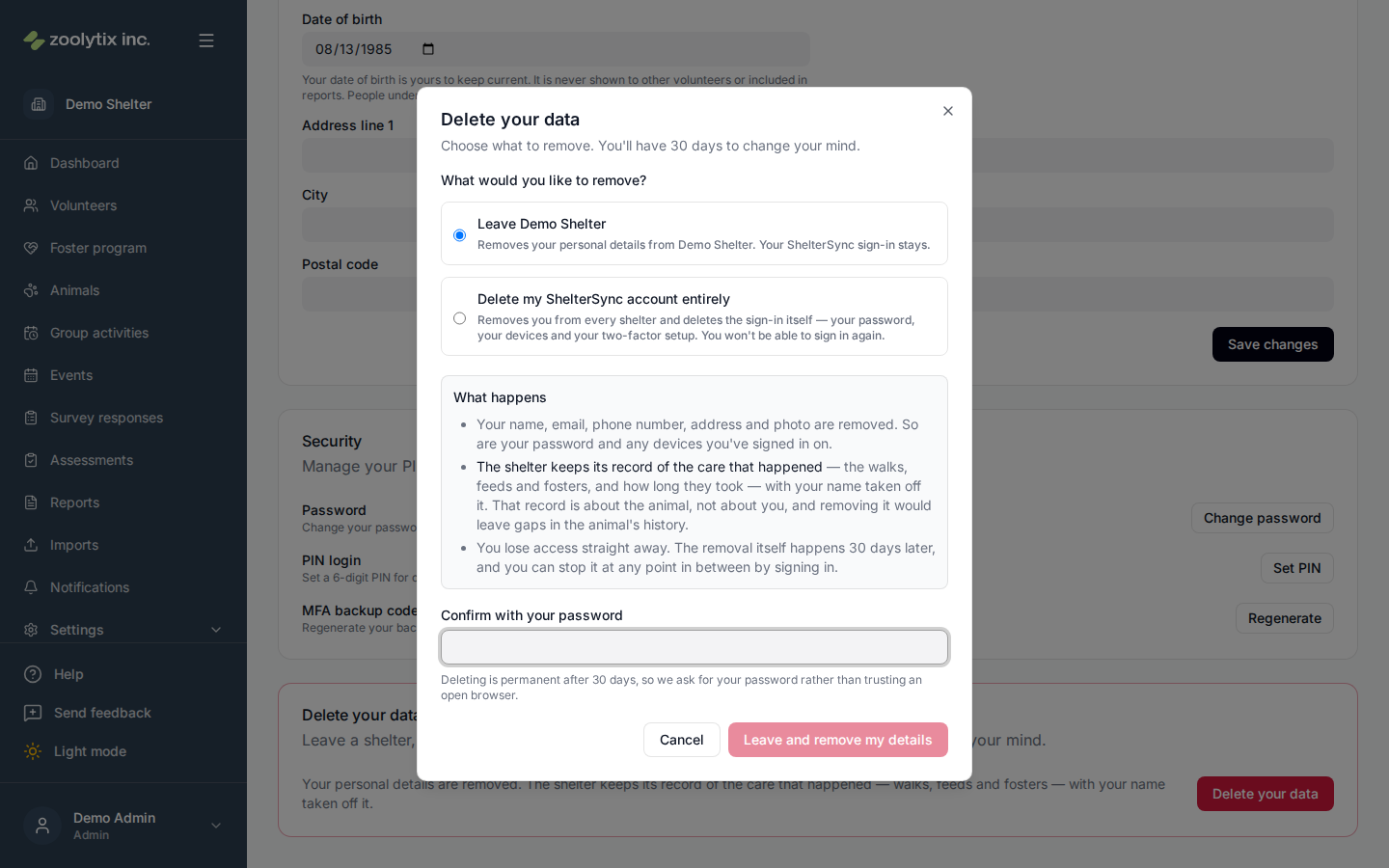
You choose between two different things:
- Leave one or more shelters. Your personal details are removed from the shelters you pick. Your ShelterSync sign-in stays, and so does any shelter you didn't pick. If you belong to just one shelter, this is simply "leave that shelter".
- Delete your ShelterSync account entirely. This removes you from every shelter and deletes the sign-in itself — your password, your devices, and your two-factor setup. You won't be able to sign in again.
Picking every shelter one by one is not the same as deleting your account: the first leaves your sign-in intact, the second doesn't.
What is removed, and what stays
Your name, email, phone number, address, date of birth and profile photo are removed, along with your password, your signed-in devices and your two-factor setup.
The shelter keeps its record of the care that happened — the walks, the feeds, the fosters, and how long each took — with your name taken off it. That record is about the animal rather than about you, and removing it would leave gaps in the animal's history that the shelter needs. The shelter's own totals don't change either, for the same reason. What goes is the connection between those records and you.
The 30 days
You're asked for your password, because deleting is permanent and shouldn't be something an open laptop can do.
Once you confirm, you lose access straight away and the removal itself happens 30 days later. During those 30 days you can still sign in — but signing in won't give ShelterSync back. It takes you to a page showing what's being removed and when, with one button: Stop this deletion. Stopping it restores your account completely, including everything the shelter could see about you before. A phone or browser of yours that the shelter hasn't approved yet, when your role requires device approval, goes back to waiting for approval, as it would have without the deletion.
After the 30 days are up, it's done and can't be undone.
What we email you
We send two emails, both to the address on your account:
- When the removal starts, confirming what's being removed and the date it becomes permanent.
- A week before that date, reminding you it's about to happen.
Both tell you how to stop it, and both go to your account's email address — never to one somebody else typed in.
If either arrives and you didn't ask for anything, someone else may have got into your account. Stop the deletion using the link in the email, change your password, and tell your shelter. Your data is still there while the 30 days are running: that's what the time is for.
If ShelterSync won't let you
Deletion is refused while an animal is in your foster care, or while you have an activity you haven't finished. An animal must never be in a home with no record of who has it. The refusal tells you which animal or activity, and who to speak to — sort that out and try again.
If you're leaving several shelters at once and only one of them has something outstanding, the others still go ahead; only the one with the animal or activity waits.
If you can't sign in
If you've lost access to ShelterSync but still have your email, ask an administrator at your shelter to start the removal for you. They can only start it — you confirm it yourself from a link we email you, and nothing happens until you do.
That link opens a page showing what will be removed and a single Yes, remove my data button. Opening the page changes nothing: only pressing the button does, so a link opened by accident — or automatically by your email provider's link checker — is harmless. If you don't press it, the request expires on its own and your account is untouched. If you weren't expecting the email at all, close the page and tell us.
Fields explained
| Field | What it means |
|---|---|
| Phone | Pick the country, then type the local number — the country code is added for you, so don't type it yourself. Your phone is used for sign-in and SMS verification codes, so keep it current. If SMS codes are on, changing or removing the number turns them off until you turn them on again and confirm a code sent to the new number. You can try to change your number up to 10 times an hour; if you manage people at a shelter, changing someone's phone or email counts toward the same 10. |
| Date of birth | Yours to keep accurate — you don't need an administrator to correct it. It is never shown to other volunteers and never appears in reports or exports, except in the copy of your own data that you ask for. Everyone using ShelterSync must be at least 13, and anyone under 18 gets a private profile: their name stays off the leaderboard and their activity is not shown to other volunteers. |